Studio
Launch and operate the multi-frontend Studio for pipeline preview, streaming, and interactive world-model debugging.
On this page
Introduction
WorldFoundry Studio is a thin visual entrypoint around repo pipelines. The model is fixed at launch time; use a new process for a different model family.
Studio exposes multiple frontends:
world— Interactive world models. Standalone WebRTC console with a resident model runtime, reliable input-edge DataChannel, bounded in-memory frame queue, one persistent video track, immersive fullscreen, and a live runtime log. Decoded frames stream in memory without materializing an MP4 per control step.points— Viser point clouds / meshes. Starts native Viser directly instead of embedding it in the console shell.embodied— Embodied simulators. Planned. URL bridge only: Studio registers an external simulator URL and tunnel hints; no in-tree embodied viewer yet.spark— 3DGS. Starts the standalone Spark 3DGS viewer with repository-local Spark assets.media— Video, image, and audio artifact preview.rerun— Rerun recordings and timeline inspection.auto— Default. Routes interactive worlds toworld, 3D scenes tospark, point/depth workflows topoints, and embodied policies toembodied.
What it shows
- World console — Live video, keyboard and joystick controls, immersive fullscreen, and runtime logs.
- Geometry viewers — Gaussian splats in Spark; point clouds and meshes in Viser.
- Workspace — Job status, preview media, artifact downloads, and viewer launch controls.
Workspace mode
For multi-model validation and release QA, run the workspace app instead of a single-model Studio process:
source tmp/worldfoundry_unified_env.sh
conda activate "${WORLDFOUNDRY_UNIFIED_ENV_PREFIX}"
bash scripts/workspace/run_workspace.sh \
--host 127.0.0.1 \
--port 7870 \
--max-jobs 8Use explicit roots when your checkpoints or benchmark data live outside the default cache:
bash scripts/workspace/run_workspace.sh \
  --ckpt-dir /path/to/checkpoints \
  --data-dir /path/to/benchmark-data
The launcher is open-source friendly and does not depend on machine-specific
paths. It resolves assets in this order: command-line option, already exported
environment variable, repo-sibling ckpt/ or data/ directory when present,
env-file value from tmp/worldfoundry_unified_env.sh, then
~/.cache/worldfoundry/....
First-time CUDA setup is bash scripts/setup/bootstrap_worldfoundry.sh, the same official first-clone script as the Quickstart. Start the Workspace from that unified model runtime, not from a
lightweight UI-only environment. For CUDA 12.8 hosts this is usually
worldfoundry-unified-cu128 after source tmp/worldfoundry_unified_env.sh. If
LOAD or START fails with a missing import such as cv2, restart 7870
from that unified environment before debugging model code.
Do not copy or relocate a prepared conda environment between machines. Native
Python and OpenSSL links can point back to the original prefix, which makes
resident inference workers fail even when the browser server starts. If the
Workspace reports a missing python3.x, missing cv2, or libssl/libcrypto
error, recreate or verify the unified env through the public setup command:
bash scripts/setup/bootstrap_worldfoundry.sh --verify-only
source tmp/worldfoundry_unified_env.sh
bash scripts/workspace/run_workspace.sh
Open:
http://127.0.0.1:7870/The workspace is the preferred UI for release validation.
Use it to submit inference jobs, inspect model-specific forms, review artifacts,
and compare runs without switching between multiple one-off scripts.
Those Workspace jobs are visual smoke (python -m worldfoundry.studio.workspace_job infer). Everyday reproducible / model-page commands use worldfoundry-eval run <id> --pipeline.task-profile …. See CLI entrypoints.
Workspace also supports evaluation jobs. For VBench, select Evaluation,
choose benchmark vbench, put generated videos in Dataset Root (or an
official VBench results JSON in Results Path), and set Metrics to one or
more dimensions such as aesthetic_quality, motion_smoothness, or the preset
custom_supported. VBench-specific runtime options such as
{"mode":"custom_input","load_ckpt_from_local":true} go in Eval Runtime
JSON.
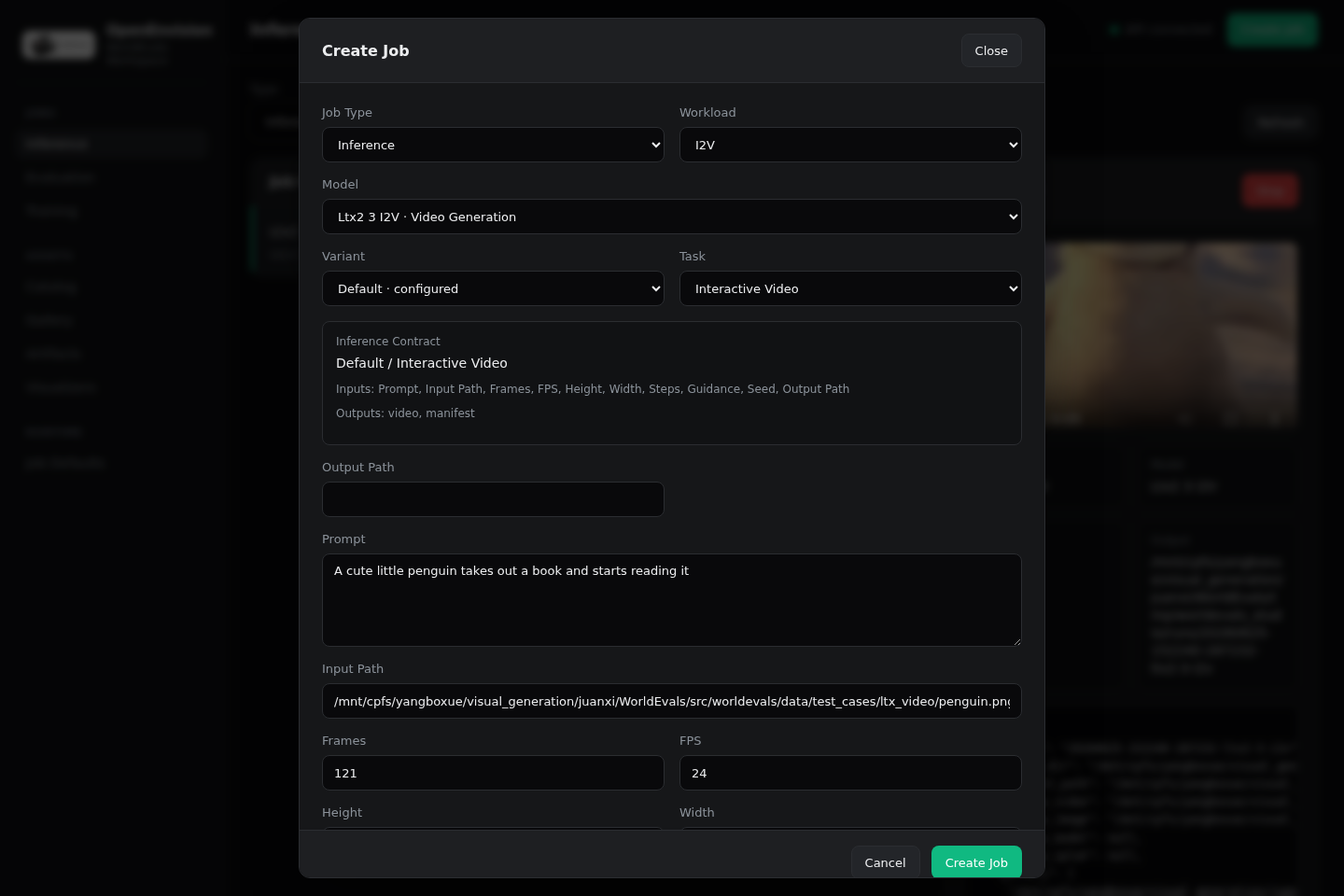
Create Job configuration
There is no separate Settings page in the Workspace UI. Configure each job in the Create Job dialog before submission.
- Model / variant / task profile — Which catalog entry runs and which official input contract is exposed.
- Prompt, input path, dynamic task fields — Model-specific inputs from the inference contract.
- Device, backend, attention — Runtime device and loading path (
auto,from_pretrained,api_init). - Frames, FPS, height, width, steps, guidance, seed — Generation parameters sent in the job payload.
- Runtime checks — Optional memory/compile toggles such as Torch Compile, CPU Offload, VAE Offload, and Text Encoder Offload. These appear only when the selected model advertises support.
- Call JSON / Load JSON — Advanced overrides merged into
call_kwargsandload_kwargs.
When you open Create Job or switch task profiles, the form is prefilled from Workspace defaults loaded at startup. Model-specific official demo values from the catalog and task profile still take precedence over those shared defaults.
Default values when no settings file is present:
Key
deviceDefault
cuda, orWORLDFOUNDRY_STUDIO_DEVICEwhen set- Default
backendauto - Default
attention_backendauto - Default
fps16 - Default
num_frames81 heightwidthDefault
720×1280- Default
num_inference_steps30 - Default
guidance_scale7.5 - Default
seed-1 - Default
torch_compilecpu_offloadfalse
Optional persisted defaults
To reuse the same defaults across Workspace restarts, point the server at a JSON settings file:
export WORLDFOUNDRY_STUDIO_SETTINGS_FILE=/path/to/studio-settings.jsonOn startup, the Workspace loads that file into /api/settings. The Create Job
form reads those values through GET /api/settings. Operators can also update
the file programmatically with POST /api/settings:
curl -sS -X POST http://127.0.0.1:7870/api/settings \
  -H 'Content-Type: application/json' \
  -d '{"values":{"fps":12,"num_frames":49,"attention_backend":"torch"}}'
When WORLDFOUNDRY_STUDIO_SETTINGS_FILE is unset, defaults live only in the
running Workspace process and reset on restart.
Fast jobs and preflight checks
Workspace inference defaults to a fast job path. It assumes the selected conda environment, checkpoint roots, and viewer dependencies were prepared before the server was launched. Keep this default for normal repeated inference.
Turn checks on only for setup debugging or release preflight:
Variable
WORLDFOUNDRY_STUDIO_RUNTIME_CHECKSDefault skipped
Set to
strictto validate runtime imports and local model paths before loading a pipeline.WORLDFOUNDRY_STUDIO_CHECK_RUNTIME_COMPLETENESSDefault skipped
Set to
1to recheck in-tree 3D/4D entrypoints while building the Studio catalog.- Default
WORLDFOUNDRY_STUDIO_RESIDENT_WORKERSautoSet to
0to disable long-lived conda workers and return to subprocess-per-job dispatch. WORLDFOUNDRY_STUDIO_RESIDENT_WORKER_MODELSDefault all eligible
Limit resident workers to selected model IDs, for example
matrix-game-2; torchrun/multi-GPU jobs still use one-shot subprocesses.- Default
WORLDFOUNDRY_STUDIO_ARTIFACT_SCAN_MODEmissingScan the output directory only when required artifacts are missing from the run record.
- Value
WORLDFOUNDRY_STUDIO_ARTIFACT_SCAN_MODEalwaysForce a full recursive output scan for models that do not return artifact paths.
- Value
WORLDFOUNDRY_STUDIO_ARTIFACT_SCAN_MODEoffNever scan the output directory; rely on
preview_*,artifact_paths, andrrd_path. WORLDFOUNDRY_STUDIO_VALIDATE_PREVIEW_VIDEODefault skipped
Set to
1to decode candidate preview videos before accepting them.WORLDFOUNDRY_STUDIO_EXTRACT_VIDEO_PREVIEW_IMAGEDefault skipped
Set to
1to extract a still image from generated videos for preview.WORLDFOUNDRY_STUDIO_BUILD_RERUN_PREVIEWDefault skipped
Set to
1to build.rrdpreviews automatically for geometry outputs.
For the fastest finish path, model runtimes should return explicit
preview_image, preview_video, artifact_paths, rrd_path, and output_dir
values in their run record. Use always scanning only as a compatibility mode
for older runtimes that write files without reporting them.
Resident workers keep the conda child process alive across jobs so the child
StudioManager can reuse its pipeline cache. Set
WORLDFOUNDRY_STUDIO_RESIDENT_WORKERS=0 when debugging process startup or when
you need every job to release GPU memory immediately after completion.
Use Visualizers, Gallery, and Artifacts for quick visual QA. They expose recent generated videos, images, manifests, and direct artifact links. Before making release claims, check the run against the release gates in Validation and keep its run manifest and scorecard.
Workspace visualizers
The 7870 Workspace is the browser entrypoint for the visualization stack.
Open the Visualizers tab, then use each card's Launch, Open, and
Stop buttons. The iframe under each card embeds the live viewer, so users
do not need to copy URLs during normal QA.
Embodied simulators are not a Workspace visualizer. --frontend embodied only
registers an external simulator URL and prints tunnel hints; start the
simulator yourself and pass --simulator-url.
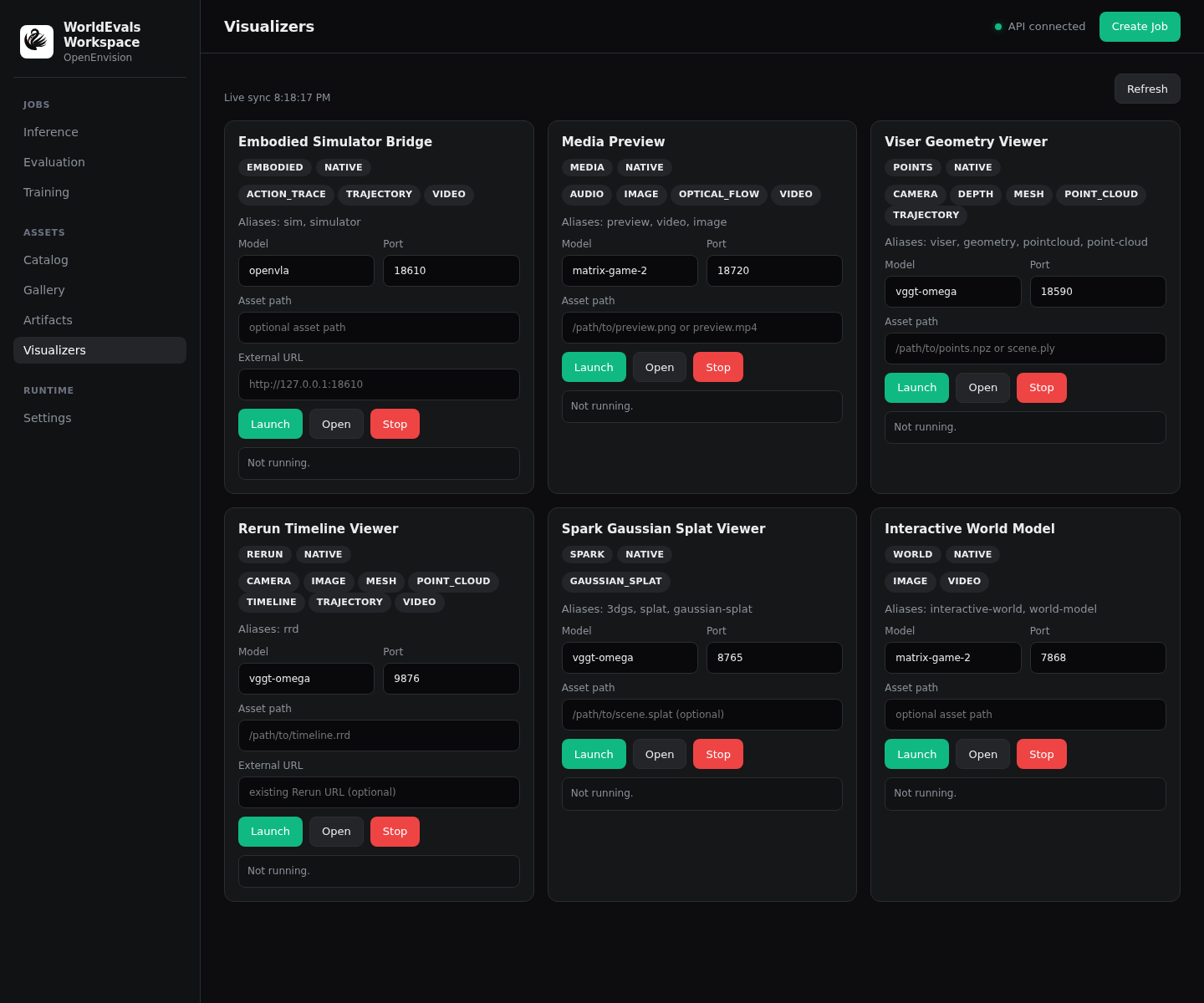
World Rollout Viewer
Buffered realtime target for action-conditioned roaming. Controls are sampled continuously while generated chunks are prefetched.
Port 7868Artifacts image, video, action_trace
Launch
python -m worldfoundry.studio.cli matrix-game-2 --frontend world --port 7868Viser Geometry Viewer
Point clouds, depth-derived point sets, meshes, camera poses, and trajectories.
Port 18590Artifacts ply, pcd, xyz, glb, gltf, obj, npz
Launch
python -m worldfoundry.studio.cli pi3 --frontend points --asset /path/to/scene.plyRerun Timeline Viewer
`.rrd` timelines and recordings with synchronized cameras, frames, tracks, and 3D entities.
Port 9876Artifacts rrd
Launch
python -m worldfoundry.studio.cli vggt --frontend rerun --asset /path/to/recording.rrdSpark Gaussian Splat Viewer
3D Gaussian splats via the in-tree Spark frontend. Live preview uses the Spark.js Hello World butterfly demo.
Port 8765Artifacts splat, spz, ksplat, sog, splat-ply
Launch
python -m worldfoundry.studio.cli vggt --frontend spark --asset /path/to/scene.splat
world defaults to port 7868. Set a port manually only when your deployment
requires a fixed proxy route.
The realtime frontend requires worldfoundry[studio_realtime] (also included
by worldfoundry[ui]). Model loading begins in the background when the server
starts. A session then keeps one pipeline context and one execution thread
resident; WASD/IJKL key edges are resampled at chunk boundaries while RGB
frames are delivered over a long-lived WebRTC track. Per-run manifests,
artifact scanning, and MP4 encoding remain Workspace/offline responsibilities
and are intentionally absent from the control-to-frame hot path.
Latency-oriented defaults can be tuned without changing model catalog quality profiles:
Playback & generation
- Default16
WORLDFOUNDRY_REALTIME_FPSWebRTC video pacing and input-resampler rate.
- Default9
WORLDFOUNDRY_REALTIME_CHUNK_FRAMESTarget frames per generated chunk; known model temporal contracts may override it.
- Defaultmodel default; LingBot Fast 4
WORLDFOUNDRY_REALTIME_INFERENCE_STEPSExplicit latency/quality override. Non-distilled models are not silently reduced to four steps.
- Default1
WORLDFOUNDRY_REALTIME_WARMUP_CHUNKSBackground stream warmup; set 0 to disable or raise it for compile/autotune experiments.
- Defaultunset
WORLDFOUNDRY_REALTIME_PREWARM_TIMEOUT_SECONDSOptional deadline for configure plus warmup chunks. The server reports an overrun after the current non-cancellable model call returns; 0 disables it.
Queue & presentation
- Defaultmax(chunk, 8)
WORLDFOUNDRY_REALTIME_FRAME_QUEUEOne steady-state chunk of bounded playback buffering.
- Defaultlatest-interactive
WORLDFOUNDRY_REALTIME_FRAME_QUEUE_POLICYUse latest-interactive to bound latency under congestion or ordered-quality to preserve every frame. Count-exact prompt/segment sessions always enforce ordered-quality.
- Defaulthold-last
WORLDFOUNDRY_REALTIME_PRESENTATION_MODEWebRTC A/B switch. hold-last preserves the compatible constant clock; real-frames gives pacing to the chunk presentation manager and sends no repeated frames through its two-frame mailbox.
- Default2 × model FPS
WORLDFOUNDRY_REALTIME_PRESENTATION_MAX_FPSMaximum active-chunk drain rate while a pending chunk is waiting in real-frames mode.
- Defaultlegacy-dual
WORLDFOUNDRY_REALTIME_SOCKET_PACING_MODEWebSocket A/B switch. client-only disables server-side frame sleeps and leaves the existing browser presentation clock as the sole pacing owner.
- Defaulthalf a chunk
WORLDFOUNDRY_REALTIME_BACKPRESSURE_MSPreserve every frame during normal playback; evict stale frames only after this congestion budget expires.
RTX post-process
- Defaultidentity
WORLDFOUNDRY_REALTIME_POSTPROCESS_PRESETSelect identity, rtx-super-resolution, rtx-super-resolution-ultra, or rtx-deblur-ultra. RTX choices are explicit opt-ins and fail before serving if their runtime is unavailable.
- Defaultpreset default (2, or 1 for deblur)
WORLDFOUNDRY_REALTIME_RTX_SCALESpatial VSR scale. NVIDIA VFX supports up to 4x; same-resolution denoise/deblur modes require 1.
- Defaultunset
WORLDFOUNDRY_REALTIME_RTX_OUTPUT_WIDTHWORLDFOUNDRY_REALTIME_RTX_OUTPUT_HEIGHTOptional explicit RTX output dimensions. Set both or neither.
- Defaultpreset default
WORLDFOUNDRY_REALTIME_RTX_QUALITYOverride the NVIDIA VFX quality enum, for example HIGH, ULTRA, DEBLUR_ULTRA, or HIGHBITRATE_HIGH.
- DefaultStudio device index, otherwise 0
WORLDFOUNDRY_REALTIME_RTX_DEVICECUDA device index owned by the VFX effect.
- Defaultfalse
WORLDFOUNDRY_REALTIME_RTX_NON_BLOCKINGRequest asynchronous VFX execution. WorldFoundry still synchronizes before cloning the borrowed DLPack output, so this does not weaken memory safety.
- Defaulttrue
WORLDFOUNDRY_REALTIME_RTX_USE_CURRENT_STREAMPass the current PyTorch CUDA stream pointer to NVIDIA VFX; disable only when diagnosing stream interop.
Profiling
- Default5
WORLDFOUNDRY_REALTIME_PERF_LOG_INTERVAL_CHUNKSEmit a structured timing summary with stage p50/p90 values every N chunks; set 0 to disable periodic summaries.
- Default0
WORLDFOUNDRY_REALTIME_PERF_WARMUP_CHUNKSMark and exclude the first N session chunks from timing summaries. Raw JSONL events retain the warmup marker.
- Defaultunset
WORLDFOUNDRY_REALTIME_PERF_JSONLOptional path for one canonical realtime.chunk_timing JSONL event per chunk. Use only while profiling to avoid hot-path file I/O.
Session & network
- Default30
WORLDFOUNDRY_REALTIME_LIVENESS_TIMEOUT_SECONDSReclaim a session whose browser heartbeats disappear without killing a slow in-flight chunk.
- Default5
WORLDFOUNDRY_REALTIME_SHUTDOWN_TIMEOUT_SECONDSTotal deadline for cooperative async teardown of preload, session workers, transports, and runtime reset. It bounds the shutdown handler but does not force-kill a running model thread.
- Defaultunset
WORLDFOUNDRY_REALTIME_ICE_SERVERS_JSONOptional browser-compatible STUN/TURN iceServers JSON for hosts that are not directly reachable.
Optional NVIDIA RTX post-processing
RTX Video Super Resolution is outside the model's causal state: it transforms
decoded RGB frames immediately before transport and preserves frame count,
ordering, dtype, and numeric range. Studio advertises the postprocessed size as
the transport's Native resolution and derives smaller transport choices
from it. The package is intentionally absent from
the default and all extras because nvidia-vfx uses NVIDIA's proprietary
license. Install and select it explicitly:
pip install 'worldfoundry[studio_realtime,rtx_postprocess]'

export WORLDFOUNDRY_REALTIME_POSTPROCESS_PRESET=rtx-super-resolution
export WORLDFOUNDRY_REALTIME_RTX_SCALE=1.5
python -m worldfoundry.studio.cli <model-id> --frontend world --device cuda:0
The adapter validates the installed package, CUDA visibility, device index,
Turing-or-newer compute capability, and the Linux NGX driver library before the
server starts. It then loads the selected native effect and processes one
representative frame, so an incomplete driver image fails before Studio begins
serving. The backend receives contiguous CHW float32 CUDA frames in [0, 1],
and its borrowed DLPack output is cloned before the next effect call. Inspect
static prerequisites or run the full native probe without starting Studio:
python -c 'from worldfoundry.core.media.processing.rtx import inspect_rtx_vfx_capability as check; print(check(device=0).to_payload())'
python -c 'from worldfoundry.core.media.processing.rtx import probe_rtx_vfx_runtime as probe; print(probe(device=0).to_payload())'
On Linux, VideoSuperRes also needs libnvidia-ngx.so.1. Compute-only or
headless driver images can omit it even when CUDA and nvidia-smi work. Install
the NGX/OpenGL userspace component from the exact same driver release
(commonly libnvidia-gl-<driver-major>) and make it visible to the dynamic
linker before Python starts; do not mix driver-library versions.
Supported OS and driver versions are controlled by NVIDIA; check the current
NVIDIA VFX Python requirements before
deployment. VSR increases transport pixels and adds work to postprocess_ms,
so capture an A/B trace and keep the regression gate below. For low-latency
control, start at 1.5x HIGH; reserve ULTRA and 2–4x output for GPUs with
measured headroom. rtx-deblur-ultra is same-resolution and therefore avoids
the bandwidth increase.
Realtime performance regression gate
Capture a representative interaction with raw timing enabled, then check the
latest matching session against an explicit JSON manifest. Warmup chunks remain
in the trace for diagnosis but are excluded when their warmup marker is true.
export WORLDFOUNDRY_REALTIME_PERF_JSONL=outputs/realtime-timing.jsonl
export WORLDFOUNDRY_REALTIME_PERF_WARMUP_CHUNKS=1{
"schema_version": "worldfoundry-realtime-regression-v1",
"cases": [{
"name": "lingbot-webrtc",
"selectors": {"model_id": "lingbot-world", "transport": "webrtc"},
"thresholds": {
"min_chunks": 10,
"min_throughput_fps": 16,
"max_dropped_frames": 0,
"max_queue_depth": 16,
"max_stage_p90_ms": {"generation_ms": 650, "model_ms": 500}
}
}]
}Python callers can load this file with RealtimeRegressionManifest.read_json(),
read the trace with read_realtime_trace(), and pass both to
evaluate_realtime_manifest() in worldfoundry.runtime.realtime_regression.
The result includes each actual value, comparator, and limit, and can be
converted to the shared PerformanceManifest API.
For remote workstations, expose the Workspace port and the viewer ports you use. For example:
ssh -L 7870:127.0.0.1:7870 \
    -L 18590:127.0.0.1:18590 \
    -L 8765:127.0.0.1:8765 \
    -L 9876:127.0.0.1:9876 \
    user@host
Artifact visualization routing
When an inference job finishes, the Workspace scans the run record and output directory for visualizable artifacts. The Artifacts tab shows Open and Open in ... actions for supported files. Job Detail keeps inline preview video/image only; it does not duplicate viewer launch shortcuts.
.png,.jpg,.jpeg,.webp,.gif,.bmp,.mp4,.mov,.webm,.mkv,.avi,.wav,.mp3,.flac,.oggmedia files — Inline Workspace preview and direct Open link.ply,.pcd,.xyz,.glb,.gltf,.objgeometry files;.npzfiles with supported geometry/depth keys — Viser Geometry Viewer.splat,.spz,.ksplat,.sog, and Gaussian-splat.plyfiles — Spark Gaussian Splat Viewer.rrdrecordings — Rerun Timeline Viewer
Base-model perception outputs
WorldFoundry keeps one visualization capability registry for in-tree 3D and perception models. Query it before writing model-specific viewer code:
worldfoundry-eval models visualizations
worldfoundry-eval models visualizations --family perception_core
worldfoundry-eval models visualizations --model raft --json
Structured 2D results share one conversion command. Supported kinds are
detection, mask, flow, tracks, feature-pca, depth, normal,
keypoints, and text:
worldfoundry-eval models visualize \
  --kind flow \
  --artifact outputs/flow.npz \
  --output outputs/flow.png

worldfoundry-eval models visualize \
  --kind detection \
  --artifact outputs/detections.json \
  --media inputs/frame.png \
  --output outputs/detections.png
This shared path covers the official output schemas used by the Depth Anything, SAM, RAFT, DINO, GroundingDINO, YOLO World, CoTracker, and related in-tree families. Native image/video outputs open in the media viewer; point clouds and meshes use Viser, Gaussian splats use Spark, and synchronized scene recordings use Rerun. The registry command is the authoritative per-model mapping.
Open the run in Workspace and use the Artifacts tab to confirm viewer routing for files that already exist on disk. The table above is the routing reference; the Artifacts actions are authoritative for a specific run.
For model authors, the most reproducible path is to write outputs under the Studio run output directory and include stable paths in the run record:
preview_imageorpreview_videofor quick media review.artifact_pathsfor raw generated assets.rrd_pathfor Rerun recordings.output_dirfor additional files that should be discoverable from the run.
3D reconstruction models should export browser-readable geometry such as
.ply, .glb, .gltf, .obj, .pcd, .xyz, or compact point-cloud/depth
.npz files. 3DGS models should export a native splat file, or a binary little-endian
Gaussian-splat PLY whose header contains splat attributes such as scale,
rotation, opacity, and spherical-harmonic color fields. The Workspace
distinguishes ordinary PLY geometry from Gaussian-splat PLY files before
choosing Viser or Spark.
Coordinate-system contract
Viewer launch is part of the geometry contract. A valid artifact can still look upside down or tilted when its world frame is interpreted twice. Keep points, meshes, camera-to-world transforms, frustums, and trajectories in one declared frame:
- An official GLB that already applies OpenCV-to-OpenGL alignment must use
coordinate_preset=asset-nativeand the exporter-defined up axis. VGGT and VGGT-Omega official GLBs use+Yup andalignment=none. - A raw VGGT/VGGT-Omega prediction NPZ remains in the model's OpenCV frame, so
Viser applies
coordinate_preset=opencv-to-openglonce and uses+Yup. - Raw UniDepth V2 and UniK3D model-point NPZ files also use the OpenCV camera
frame. Their Workspace PLY exporter instead persists
x-right/y-up/z-forward, so those PLY files useasset-native,+Yup, andalignment=nonewithout a second flip. - DUSt3R, LoGeR, and Pi3 PLY point clouds keep their predicted camera-to-world
sidecars. Viser applies
first-camera-openglto points and cameras together, uses+Yup, and frames the central 5-95% geometry range so sparse outliers do not shrink the useful scene. - Rerun recordings must log the world
ViewCoordinatesand use the same camera convention in everyPinhole. Cut3R and MonST3R use RDF for both world and camera entities. - Never fix an orientation mismatch by flipping only the point cloud. Apply the same rigid transform to geometry and camera-to-world poses, then verify reset, orbit, and timeline interaction in a browser.
Workspace resolves the proven VGGT, DUSt3R, LoGeR, and Pi3 defaults automatically.
The Visualizer defaults also cover UniDepth V2 and UniK3D raw/Workspace assets.
The Visualizer Params JSON remains an explicit override for other exporters. Viser reports the
actual bound port when its requested port is occupied. Rerun uses WebGPU
by default; set WORLDFOUNDRY_STUDIO_RERUN_RENDERER=webgl only when the target
browser requires that fallback.
Choosing a 3D viewer
Keep the default route artifact-driven so model integrations do not duplicate viewer code:
- Static point cloud, mesh, depth-derived geometry, camera frustums — Default Viser. Use the official viewer when it carries a model-specific control or annotation that cannot be represented as shared scene layers.
- Time-varying geometry, camera trajectory, synchronized images/depth/actions — Default Rerun. Use the official viewer when the official timeline cannot be exported to
.rrdwithout losing semantics. - Gaussian splats — Default Spark. Use the official viewer when the upstream renderer requires a nonstandard shader or splat format.
An inference run is not visually verified merely because a viewer process starts. Release evidence for a 3D/4D method should confirm finite geometry, camera data, and the declared coordinate frame, then open the actual artifact in a browser, check a nonblank and readably framed canvas, exercise reset/orbit or timeline controls, and review console errors. Preserve an official viewer as a small visualization plugin; do not copy its inference runtime or build a per-model frontend when shared Viser/Rerun scene layers are sufficient.
Studio screenshots
These screenshots are from the 7870 workspace used for model release
validation.
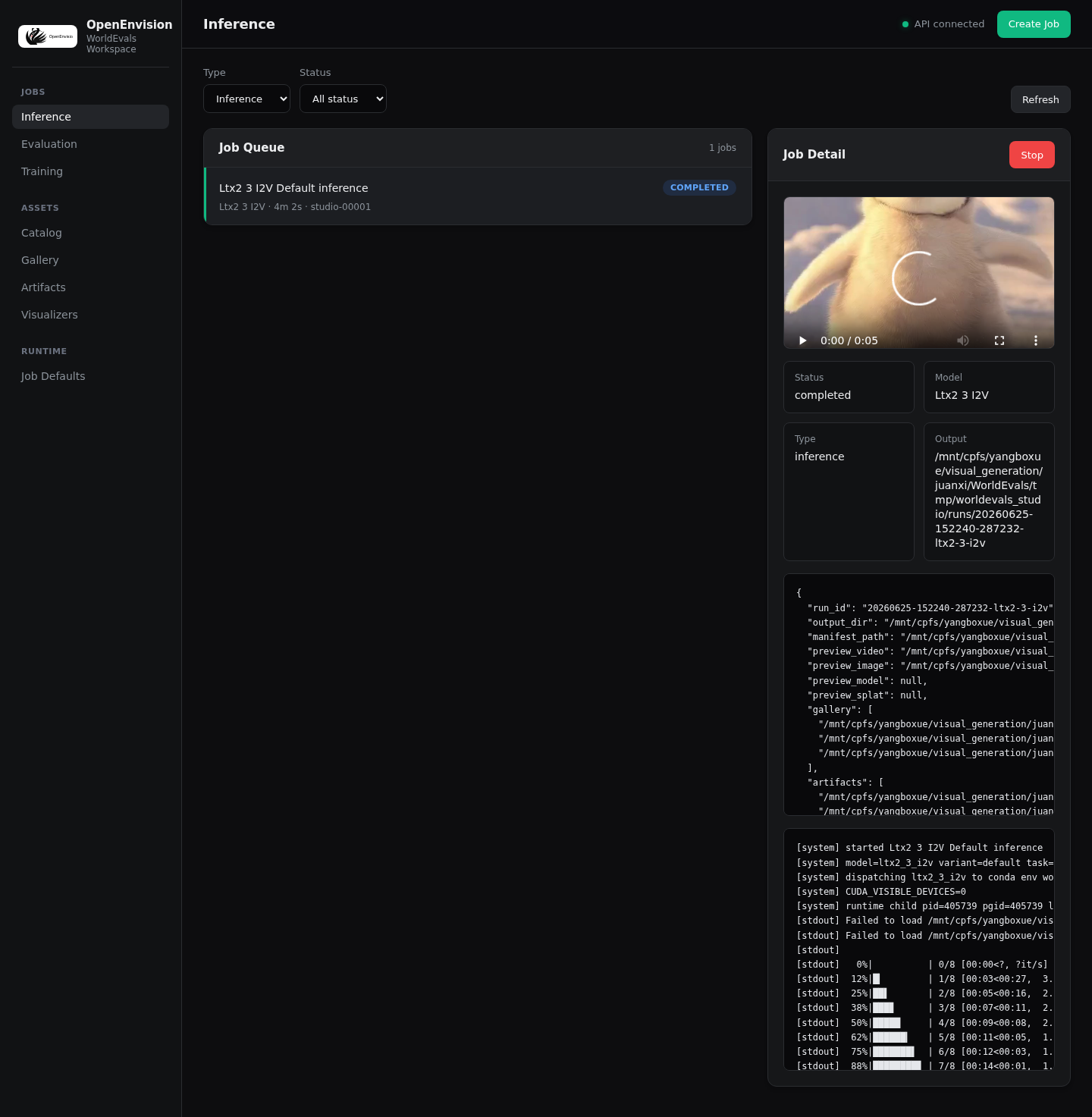
- Inference jobs — Completed runs, inline preview media, status, and logs.
- Create Job — Model-specific inputs and official demo defaults.
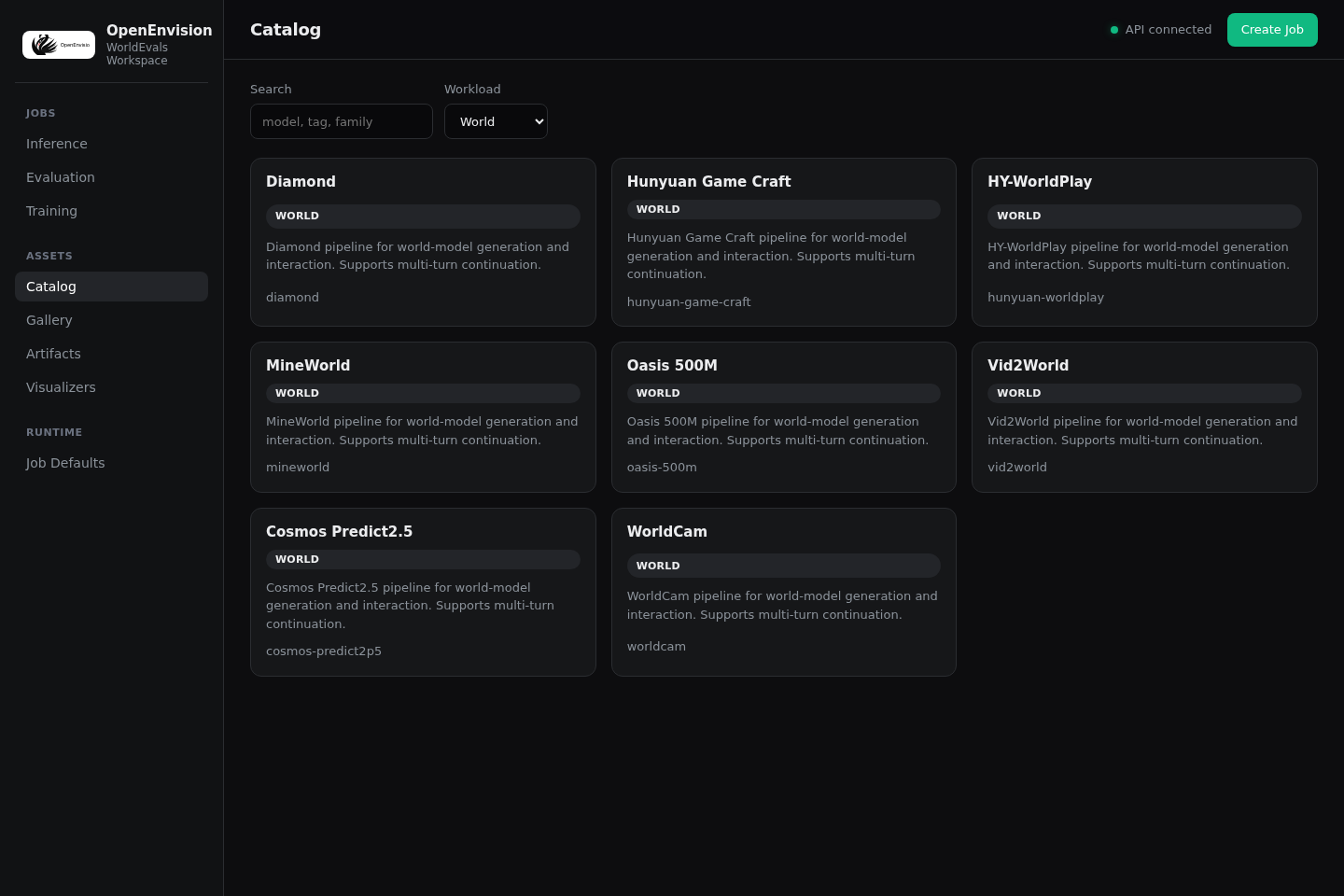
- Catalog — World-model filtering and model metadata.
- Gallery — Recent visual outputs for side-by-side QA.
Inference jobs
The queue shows submitted runs, final status, and inline preview video or image when the run record exposes them.
Create Job
The form should expose the model's actual input contract. The screenshot below is only a UI-shape example; release demo claims should be checked against the release gates and the matching run manifest.
Catalog
Catalog filtering is useful for checking which world-model entries are visible to the workspace before submitting jobs.
Gallery
The Gallery gives a compact visual pass over recent inference outputs and preview artifacts.
Launch matrix
- LingBot realtime —
python -m worldfoundry.studio.cli lingbot-world --variant fast --frontend world --device cuda:1. Resident runtime with continuous WebRTC video and DataChannel controls. - LingBot camera —
python -m worldfoundry.studio.cli lingbot-world --variant base-camera --device cuda:1. Slower, camera-centric profile. - MatrixGame —
python -m worldfoundry.studio.cli matrix-game-2 --device cuda:1. Interactive world navigation. - WorldCam —
python -m worldfoundry.studio.cli worldcam --device cuda:1. Camera-path generation and view control. - Hosted APIs — Configure provider credentials and endpoint settings in Workspace inference jobs or
worldfoundry run <model>, then preview exported artifacts with themediafrontend. - Viser point cloud —
python -m worldfoundry.studio.cli pi3 --frontend points --asset /path/to/scene.ply --port 18590. Native Viser UI. - Spark 3DGS —
python -m worldfoundry.studio.cli vggt --frontend spark --asset /path/to/scene.splat --port 8765. Standalone Spark canvas. - Embodied simulator —
python -m worldfoundry.studio.cli openvla --frontend embodied --simulator-url http://127.0.0.1:9000. Planned. Registers an external simulator URL only; does not launch an in-tree viewer.
Recommended local start:
cd /path/to/WorldFoundry
PYTHONPATH=. WORLDFOUNDRY_STUDIO_PORT=7868 conda run -p "${WORLDFOUNDRY_UNIFIED_ENV_PREFIX}" python -m worldfoundry.studio.cli \
  lingbot-world \
  --variant fast \
  --model-ref /path/to/checkpoints/lingbot-world-fast \
  --device cuda:1
For an editable checkout that is not installed into the active environment, keep
PYTHONPATH=. in the command.
Studio prints the resolved workspace, model, cache, and Hugging Face cache roots at startup, so path issues are visible before a run begins.
Open:
http://127.0.0.1:7868For remote GPU nodes, use the SSH tunnel printed by Studio.
The world process serves the page and WebRTC signaling on the configured HTTP
port. Video and controls then use the ICE-selected WebRTC path. A plain SSH
forward only carries signaling; for a browser that cannot directly reach the
GPU host, configure a TURN relay with
WORLDFOUNDRY_REALTIME_ICE_SERVERS_JSON.
ssh -N -L 7868:127.0.0.1:7868 user@gpu-host
# local browser:
# http://127.0.0.1:7868
The status strip reports RTC playback FPS, generation time, control latency, queue depth, and dropped stale frames. An ICE timeout is surfaced explicitly instead of leaving the page indefinitely in a connecting state.
Interaction modes
- Image World — Select a tray image or upload an image ->
START-> hold keyboard or stick controls. Image-conditioned interactive world models. - Video World — Upload a video ->
START-> continue with video-to-video world-model flows. Video-conditioned world models. - Stream — Seed input -> start one persistent session -> send key edges while frames continue. Interactive world models and continuation.
- Prompt-scheduled segments — Enter a prompt, optionally select an image, then
START; edit the prompt and pressEnterafter the current segment. Models that accept a new prompt at native segment boundaries. - Queued controlled segments — Select an initial image, dense control video, sparse control video, and prompt ->
RUN; select new controls before eachEXTEND. Long-form models with explicit per-segment control inputs. - Spatial preview — Run or export a 3D asset -> open Spark for Gaussian splats or Viser for point clouds and meshes through Workspace Visualizers.
Keyboard/live controls:
WASD = move
Arrow keys / IJKL = look
Keyboard and stick edges are sent immediately over the current realtime channel. The resident runtime samples the latest effective control state at model chunk boundaries, so input does not create a second inference request or reload the pipeline.
Live text events, idle steps, and output resolution
The world frontend exposes three ordered controls beside the keyboard and
joysticks:
- Text events: open INITIAL SCENE, choose ADD, and enter an event ID, button label, and prompt. APPLY installs the catalog before a session or replaces it while the session is live. Event buttons activate one text condition at the next model chunk boundary; CLEAR EVENT restores the base prompt. Models without a state-preserving text-update path disable this surface instead of acknowledging an update they cannot apply.
- STEP: queues exactly one generated chunk with no keyboard direction. It is useful for an idle camera or for checking a text event. It does not enable an autonomous generation loop. Queued-segment models keep STEP disabled because their next segment requires new control videos.
- OUTPUT: selects the transmitted frame size. NATIVE preserves the model output size. Smaller choices resize and letterbox only the WebRTC/WebSocket stream; they do not change model inference resolution, sampling steps, causal state, or future world quality.
Event IDs contain 1-64 letters, numbers, or _.:-; labels are at most 64
characters, prompts are at most 1,000 characters, and a catalog contains at most
12 events. Catalog updates carry a revision so a stale editor cannot silently
overwrite a newer live catalog.
The reliable control channel returns event_catalog_ack, event_ack,
step_ack, and output_config_ack. An event or output ACK means the ordered
request was accepted and reports where it takes effect (next_chunk or
next_segment); chunk_done remains the completion signal for generated
output. Resolution changes are frozen at a complete transport-chunk boundary,
so an already announced chunk is never truncated or mixed across dimensions.
Each request and ACK carries the same request_id, so rapid clicks cannot let
an older response overwrite the current UI state.
The same protocol can be driven without the built-in controls:
{"type":"event_catalog","request_id":"catalog-1","base_revision":0,"events":[{"event_id":"rain","label":"Rain","prompt":"Heavy rain begins.","category":"weather"}]}
{"type":"event","request_id":"event-1","event_id":"rain","state":"trigger"}
{"type":"event","request_id":"event-2","state":"clear"}
{"type":"action","request_id":"step-1","action":{"event":"step"}}
{"type":"output_config","request_id":"output-1","resolution":{"mode":"fixed","width":640,"height":360}}
Fixed transport dimensions must be even, at least 160x90, no larger than the
model's native/generated frame on either axis, and within the realtime
1920x1080 pixel budget. Studio advertises only source-safe presets derived
from the model catalog; if the native size is unknown, it does not guess a
fixed preset. Switching back to {"mode":"native"} removes the transport
scaler. WebRTC resize work runs before frames enter the media track, so held
frames do not repeatedly pay the resize cost or block the control event loop.
Draggable and collapsible panels
STATUS, CONTROLS, INITIAL SCENE, and RUNTIME share the same panel
behavior. Drag a panel header to float it above the viewport, click − to
collapse it, and click + to reopen it. The browser clamps floating panels to
the visible stage, raises the selected panel, and saves positions and collapsed
state locally. Dragging uses one animation-frame transform per browser frame and
does not add work to the model/frame transport path. On narrow mobile layouts,
panels stay in document flow but remain collapsible.
Immersive fullscreen and live runtime log
The fullscreen view is part of the shared world frontend and is available to
every interactive model routed to that frontend. It reuses the current peer or
socket, frame buffer, and resident model session. Entering or leaving fullscreen
does not reconnect the browser or restart generation.
- Prepare the model input and start the session normally.
- Click FULLSCREEN in the upper-left corner of the viewport, or press
F. - The viewport fills the screen and the live runtime log opens automatically.
- Click LIVE LOG or press
Shift+Lto hide or show the log without leaving fullscreen. - Press
Escor click EXIT to return to the standard Studio layout.
- FULLSCREEN /
F— Enter or leave immersive fullscreen. - LIVE LOG /
Shift+L— Toggle the runtime log in either the normal or fullscreen layout.Lalone remains the camera-right control. - CLEAR — Clear the visible log history only; the model session and runtime state are unchanged.
Esc— Leave fullscreen and return to the same active session.
The log includes client and model readiness, realtime transport state, segment
queue/generation/playback transitions, errors, and per-chunk performance data.
A completed chunk reports its frame count, generation time (gen), playback
queue depth (queue), and discarded stale frames (dropped). These entries are
session telemetry for interactive debugging; they are not persisted run
artifacts or a copy of the server's complete stdout/stderr stream.
Live log events use the existing realtime connection. The browser batches DOM updates on animation frames and retains at most the latest 120 entries, so a long session does not accumulate an unbounded log tree or add a polling loop to the frame path. When the browser permits the Fullscreen API, the button or keyboard shortcut enters native fullscreen. If native fullscreen is unavailable or blocked by browser policy, Studio keeps the same session and falls back to a viewport-filling layout. The Workspace visualizer iframe already grants fullscreen permission.
Launch flags
Flag
positional model_id--modelLaunch target.
--variantRuntime profile such as
fastorbase-camera.--model-ref--ckpt--checkpointExplicit local or repo reference.
--deviceRuntime device.
--backendauto,from_pretrained, orapi_init.--endpointExplicit API endpoint.
--frontendauto,world,points,spark,embodied,media, orrerun. Aliases such asviser,3dgsare accepted.--assetRemote asset path for native viewers, such as point cloud
.ply/.npzor 3DGS.splat/.spz/.ply.--simulator-urlNative embodied simulator URL.
--host--portOverride frontend bind host and port.
Environment
Variable
WORLDFOUNDRY_WORKSPACE_PORTWorkspace HTTP port (default
7870).WORLDFOUNDRY_WORKSPACE_HOSTWorkspace bind host (default
127.0.0.1).WORLDFOUNDRY_STUDIO_AUTH_TOKENRequired when binding a non-loopback host. Clients send
Authorization: Bearer <token>or?token=. Loopback stays unauthenticated.WORLDFOUNDRY_STUDIO_WORKSPACE_URLBase URL used by MCP Studio tools (default
http://127.0.0.1:7870).WORLDFOUNDRY_WORKSPACE_MAX_JOBSConcurrent job worker limit.
WORLDFOUNDRY_STUDIO_SETTINGS_FILEOptional JSON file loaded into
/api/settingsfor Create Job defaults.WORLDFOUNDRY_STUDIO_PORTSingle-model Studio server port.
WORLDFOUNDRY_STUDIO_MODELDefault model ID.
WORLDFOUNDRY_STUDIO_VARIANTDefault variant.
WORLDFOUNDRY_STUDIO_BACKENDDefault backend.
WORLDFOUNDRY_STUDIO_DEVICEDefault device.
WORLDFOUNDRY_STUDIO_ENDPOINTAPI endpoint.
WORLDFOUNDRY_STUDIO_FIXED_MODEL_REFFixed local model/checkpoint ref.
WORLDFOUNDRY_STUDIO_FRONTENDDefault frontend route.
WORLDFOUNDRY_STUDIO_ASSETDefault native viewer asset.
WORLDFOUNDRY_STUDIO_SIMULATOR_URLEmbodied simulator URL.
WORLDFOUNDRY_STUDIO_SPARK_PORTDefault port for the Spark frontend.
WORLDFOUNDRY_STUDIO_POINTS_PORTDefault port for the Points frontend.
WORLDFOUNDRY_STUDIO_SSH_HOSTSSH host shown in tunnel hints; set it to the user's own GPU node, for example
user@gpu-host.WORLDFOUNDRY_STUDIO_WORKSPACE_DIRStudio run/output root; falls back to
${WORLDFOUNDRY_ARTIFACT_DIR}/studiowhen set, otherwisetmp/worldfoundry_studio.WORLDFOUNDRY_STUDIO_MODEL_ROOTExtra local model repository root searched before shared roots.
WORLDFOUNDRY_MODEL_DIRShared model/checkpoint root; Studio searches it for local repos and checkpoints.
WORLDFOUNDRY_CACHE_DIRShared cache root; Studio searches
${WORLDFOUNDRY_CACHE_DIR}/hfdand${WORLDFOUNDRY_CACHE_DIR}/repos.WORLDFOUNDRY_HF_CACHE_DIROptional Hugging Face Hub cache override. Leave unset to use Hugging Face's native
from_pretrained/snapshot_downloadcache and auto-download behavior.
Only WORLDFOUNDRY_* Studio environment variables are supported.
Release evidence
Only add public demo media after the matching official configuration has run through the in-tree Studio or Studio-compatible API path. Keep the run manifest, decoded media metadata, and visual QA record with the validation artifacts so the embedded video can be traced back to an actual release candidate run.
Code layout
Each implementation has one canonical import path. There are no forwarding modules at the Studio root.
| Location | Responsibility |
|---|---|
inference/catalog.py | Discover pipelines and resolve model defaults and checkpoints. |
inference/config.py | Runtime environment and distributed process topology. |
inference/execution.py | Prepare inputs, load pipelines, execute, and persist raw run artifacts. |
inference/dispatch.py | GPU admission, managed subprocesses, resident workers, cancellation, and deadlines. |
inference/paths.py, inference/variants.py | Runtime paths and model variant selection. |
serving/workspace.py, serving/jobs.py | Workspace API and in-process UI job scheduling. |
serving/ | Authentication, file serving, telemetry, and realtime transport. |
ui/launcher.py, ui/launch_config.py | Standalone frontend routing and browser launch options. |
ui/workspace.html, ui/workspace.py | Packaged Workspace page and its asset loader. |
ui/ | Browser launch options, model interfaces, shared browser assets, and the Workspace page. |
visualization/ | Artifact discovery, viewer routing, geometry presentation, and browser backends. |
cli.py | Installed worldfoundry-studio command. |
runtime_job.py | Subprocess and resident inference worker entrypoint. |
workspace_job.py | CLI adapter for Workspace inference requests. |
The inference modules do not import the frontend, serving, or visualization
packages. StudioManager saves raw artifacts by default. Frontends explicitly
install visualization.studio.prepare_run_record as the record_processor
when they need viewer manifests or preview conversion.
studio/native and its CUDA/C++/ImGui frontend have been removed. The standalone
browser backends remain available through worldfoundry-studio.
Retained rendering helpers
visualization/plugins contains only implementations with current callers:
| Implementation | Caller |
|---|---|
perception/render.py | models visualize CLI and Grounding DINO annotation. |
perception/human_pose.py | Wan Animate's AAPoseMeta.draw_aapose conditioning image. |
scene3d/projection.py | VIPE projection videos, SLAM overlays, and video writing. |
scene3d/depth_anything_v3/export_vis.py | Depth Anything 3 depth, feature, and Gaussian exports. |
styles/colormaps.py | Depth and normal rendering in perception/render.py. |
The unused media and robotics helpers, pixelSplat training visualization, duplicate DVLT visualization, HED annotator, sky-segmentation/GLB export chain, and compatibility wrappers have been deleted. Geometry providers discover actual artifacts; a directory of Python source is not a renderable scene.
worldfoundry/representations has been removed. Depth Anything, VGGT, Pi3,
WorldFM, Lyra and the other geometry pipelines now import their runtime from
the corresponding family in worldfoundry/base_models/three_dimensions.
Checkpoint loading, preprocessing and geometry postprocessing live beside
the model code. The empty base class, marker classes and old-path forwarding
modules are gone. Studio visualization still owns artifact display.
Inference lifecycle
Managed CUDA runs acquire a device lease before launching. Explicit device
selection and fallback to one-shot workers use the same admission policy.
Resident workers retain their lease until their owned process group stops.
On Linux, file locks coordinate cooperating WorldFoundry controllers on the
same host; WORLDFOUNDRY_GPU_LEASE_DIR selects the shared lock directory
(default: /tmp/worldfoundry-gpu-leases-<uid>). Controllers sharing GPUs must
use the same directory and device identities. Unmanaged workloads are outside
this admission policy.
WORLDFOUNDRY_STUDIO_INFERENCE_TIMEOUT is one deadline for GPU queueing,
worker allocation, request queueing, execution, and output draining. It defaults
to the resident timeout setting (six hours when unset); 0 disables it.
Cancellation and failure stop the owned process group before releasing its
lease. A process that deliberately creates a different session is outside
this process-group ownership contract. Hosted API calls use their provider's
timeout and cancellation mechanisms.
Weight pipelines can be cached. API clients are request-scoped so a reused pipeline cannot retain another request's credentials.
Persistent command jobs use a separate supervisor and atomic completion receipts to recover their real exit status after the controller exits. Restored jobs require matching boot, process-start, session, and group identity before signalling a saved PID. Retention removes completed receipts together with terminal job metadata.
Checks
python -m pytest runs the public CPU inference gate. Optional renderer and UI
regressions live in tests/studio_visualization and tests/studio; install
their dependencies before selecting those suites. No real weights or API
credentials are needed by the default gate.