CLI 参考
wf 的完整命令地图、执行模式、输出契约与自动化约定。
wf 是 WorldFoundry 的标准命令行入口,覆盖 catalog 发现、readiness 检查、强类型模型推理、benchmark 执行、结果归一化、报告和验证。首次从 clone 开始跑通流程,请看快速开始;选择命令或核对命令契约时查本页。
可以安全检查
Help、catalog discovery、--model-status、--print-config、--plan-only 和本地资产检查都不会加载模型权重。CPU-only 机器或提交 GPU job 前,应先从这些命令开始。
安装与验证
激活统一环境后,从仓库根目录运行命令。
bash scripts/setup/bootstrap_worldfoundry.sh
source tmp/worldfoundry_unified_env.sh
conda activate "${WORLDFOUNDRY_UNIFIED_ENV_PREFIX}"
wf --help
bootstrap_worldfoundry.sh 是快速开始、TUI、Studio 共用的官方首次 clone 脚本。
在已有 Python 环境中开发 catalog 与核心 CLI 时:
python -m pip install -e .

# 只在需要时安装可选界面。
python -m pip install -e ".[tui]"
python -m pip install -e ".[mcp]"
具体模型和 benchmark runtime 仍可能需要其 profile 声明的环境与资产。
如果 console script 不在 PATH 中,module 入口使用同一套 parser:
python -m worldfoundry --help
python -m worldfoundry zoo models --json
不带参数运行 wf 会打印简短的首次使用提示;加 --help 才会显示完整顶层命令列表。
命令入口
wf— 文档统一使用的标准 CLI。wf tui— 终端 UI。wf mcp— MCP server。wf-studio— 独立的 Studio launcher。详见 Studio 指南。python -m worldfoundry— Editable install 或 console-scriptPATH尚未生效时的 module 备用入口。python -m worldfoundry.studio.workspace_job infer— Workspace 视觉冒烟(与 Studio UI 提交的是同一条 job 路径)。不是文档里的第一次推理命令。
选哪条命令。 日常可复现 / 模型页命令用 wf run <id> --pipeline.task-profile …。只有 Workspace 视觉冒烟才用 python -m worldfoundry.studio.workspace_job infer。
同一 Workspace 进程内,WORLDFOUNDRY_STUDIO_BATCH_MAX_SIZE(默认 1)和
WORLDFOUNDRY_STUDIO_BATCH_DELAY_MS(默认 5)控制兼容原生 Wan T2V 与
5B TI2V 常驻 worker 合批。准入要求并行作业槽、常驻权重及兼容的 Torch attention;编译批次使用 regional scope。配置在 worker 启动前生效,不跨独立 CLI 进程合批。精度与输入要求见批处理准入、预热和取消契约。
下面统一写 wf,便于 shell history、job script 和问题报告保持一致。
每一层都有 Help
把 --help 放在需要查询参数的命令后面。选项属于叶子命令,因此应写成 zoo models --json,而不是把 --json 放在顶层入口后。
wf --help
wf zoo --help
wf zoo model-show --help
wf run --help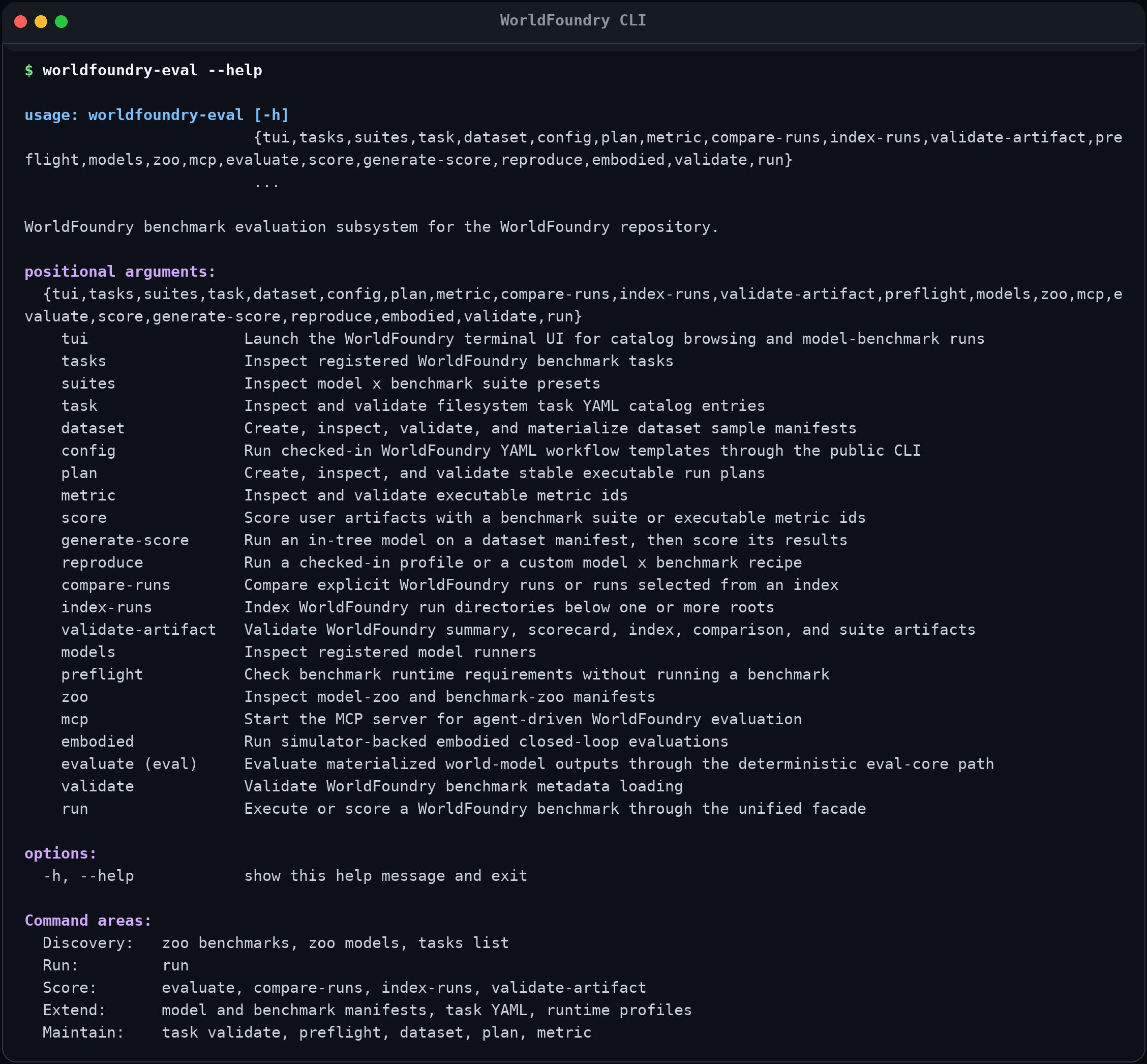
截图来自当前 CLI;可在 docs/fumadocs 中运行 npm run cli:screenshots 重新生成。
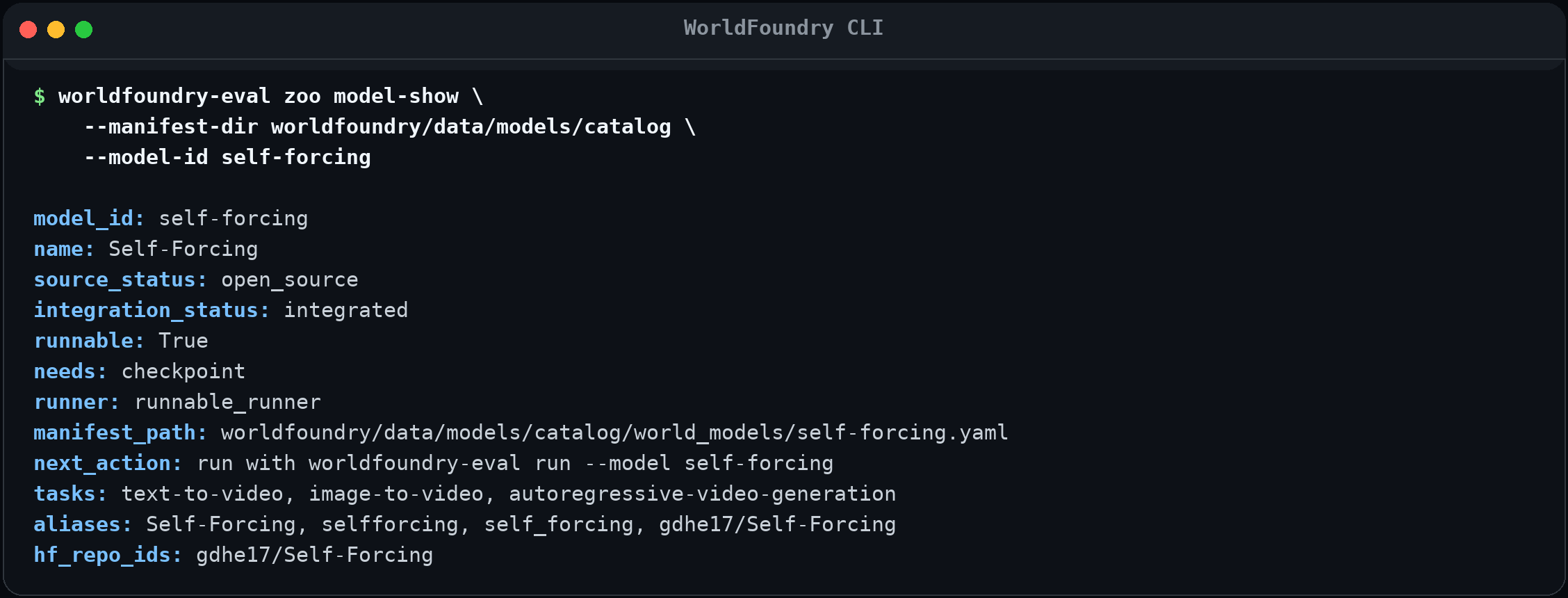
模型专属 Help
位置参数形式 run MODEL 会加载该模型的推理 schema,并把强类型的 --pipeline.*、--pipeline.load.* 与 --runtime.* 选项加入帮助页。
wf run self-forcing --help
wf run self-forcing --model-status
wf run self-forcing --print-config --json--pipeline.*控制请求输入与生成默认值。--pipeline.load.*控制 checkpoint 和模型加载字段。--runtime.*控制执行设备与 runner 设置。--model-status和--print-config只解析元数据,不加载权重。
如何选择命令
多个命令最终都能进入 evaluation core,但它们面向的起始输入不同。
- 浏览稳定的模型或 benchmark ID — 优先使用
zoo models、zoo benchmarks、zoo model-show、zoo benchmark-show。读取 release catalog,展示 readiness、alias、needs 与 next action。 - 直接运行一个模型 — 优先使用
run MODEL。提供模型专属的强类型推理参数。 - 运行一个或多个 model × benchmark cell — 优先使用
run --model ... --benchmark ...。统一处理单 cell、重复 ID、命名 suite、resume、cache 和 plan-only。 - 用 benchmark 为 artifact 目录打分 — 优先使用
score --benchmark ... --artifacts ...。面向用户的评分 intent,执行该 benchmark 的完整 protocol。 - 用指定 metric 评估 WorldFoundry result rows — 优先使用
score --results ... --metric ...。简洁的 existing-results 工作流。 - 执行已经物化的 run plan,或直接使用 eval-core 字段 — 优先使用
evaluate(别名eval)。面向 requests/results ledger 与 model-mode evaluation 的底层确定性路径。 - 从 dataset manifest 生成再评分 — 优先使用
generate-score。一个 intent 统一负责 dataset 物化、生成、cache 与 metric。 - 导入或执行某个 benchmark 的官方界面 — 优先使用
zoo benchmark-run。暴露 benchmark 专属 mode 与参数;应配合对应 Benchmark Hub 页面。 - 复现固定版本的 model × benchmark 配方 — 优先使用
reproduce。解析 recipe YAML。 - 创建索引、比较或做契约检查 — 优先使用
index-runs、compare-runs、validate-artifact。对持久化 run 输出操作,不重新运行模型。
完整命令地图
Discovery 与交互界面
tui交互式 catalog 浏览器和命令生成器。
zoomodels、model-specs、model-show、model-download、embodied-assets、benchmarks、benchmark-specs、benchmark-show、benchmark-fetch、benchmark-run。taskslist、show、catalog,用于已注册 benchmark task。suiteslist、show,用于命名 model × benchmark preset。modelslist、runtime-runners、visualizations、assets、visualize。
执行与评分
run直接强类型推理、单个 model × benchmark cell,或 suite / matrix。
score用 benchmark 评估 artifact 目录,或用指定 metric 评估 result rows。
generate-score在 dataset manifest 上运行仓内模型并为结果打分。
reproduce执行 recipe YAML。
evaluateeval对物化结果、run plan 或 model mode 执行确定性 eval-core。
embodiedplan、run、serve、merge,用于 simulator-backed closed-loop evaluation。
数据、计划与验证
task对 filesystem task YAML 执行
list、show、validate、materialize。dataset对 sample manifest 执行
create、show、validate、materialize;用locate、plan定位或规划本地/HF 数据资产。configlist、run仓内 workflow template。plancreate、show、validate稳定的worldfoundry-run-planJSON。metriclist、show、validate可执行 metric ID。preflight runtime不运行 benchmark,检查 import、环境变量、路径、CUDA 和声明的 validation 缺口。
validate使用具体 task / data selector 验证旧版 benchmark metadata 加载。
报告与集成
index-runs构建
index.json、index.jsonl与可选的无依赖 HTML 浏览器。compare-runs比较明确指定的 run 目录,或从 index 中筛选 run。
validate-artifact验证 summary、scorecard、index、comparison 和 suite schema。
mcp启动 MCP server(
--transport stdio|streamable-http|sse,默认stdio;HTTP 传输用--host/--port)。
MCP 工具
wf mcp 启动 FastMCP server(worldfoundry/mcp/server.py)。先安装 python -m pip install -e ".[mcp]":
wf mcp                                              # stdio,供本地 agent 客户端使用
wf mcp --transport streamable-http --port 8000      # HTTP 端点 http://127.0.0.1:8000/mcp
wf mcp --transport sse                              # 旧版 SSE 客户端
HTTP 传输默认绑定 127.0.0.1,可用 --host 修改。建议先调用 server_info:它返回路径、带行为提示的工具清单和推荐流程。
| 分组 | 工具 |
|---|---|
| Server | server_info |
| 发现 | list_models、get_model_info、list_benchmarks、get_benchmark_info、list_tasks、get_task_info、list_metrics、show_metric、check_benchmark_datasets |
| Run | preview_run、evaluate、list_runs、get_run_status、get_run_result、get_run_samples、cancel_run |
| Studio workspace | list_studio_models、get_studio_model_info、submit_studio_inference、list_studio_jobs、get_studio_job、wait_for_studio_job、stop_studio_job、get_studio_job_logs、list_studio_artifacts、get_studio_manifest |
工具约定:
- 每个参数在工具的 JSON schema 中都带说明,固定取值用 enum 表示(
wait:auto|async|sync;generation_cache_mode:off|read|write|read-write|refresh;mode;detail;run 的status)。 - 每个工具都声明 MCP annotations。发现和状态类工具只读;
evaluate与submit_studio_inference会启动任务;cancel_run与stop_studio_job是破坏性操作;Studio 工具会调用 Studio HTTP API,因此标记为 open-world。 list_*工具以summary视图返回一页结果:用offset/limit翻页(最后一页next_offset为null),传detail="full"获取全部字段。get_*_info始终返回完整条目。preview_run和evaluate接收model,以及benchmarks(列表)或suite_ids,并把mode、plan_only、resume、generation_cache_dir、generation_cache_mode、model_variant、requests_path、task_name、generated_artifact_dir、output_artifact、metrics传给wf run。preview_run只返回确切命令,不启动任务。evaluate返回run_id。wait="auto"时最多等待wait_timeout_s,之后返回运行中状态;再用get_run_status、get_run_result、get_run_samples跟进。- 成功结果为
{"ok": true, ...};失败为{"ok": false, "error": ..., "error_type": ...},其中error_type取not_found(id 不存在,消息中会给出相近的 id)、invalid_argument、unavailable(例如 Studio 未启动)、runtime或internal。
Studio 工具默认访问 WORLDFOUNDRY_STUDIO_WORKSPACE_URL(通常是 http://127.0.0.1:7870)。Run 文件写到
WORLDFOUNDRY_MCP_RUN_ROOT;未设置时为 runs/mcp。
Python 客户端可通过 worldfoundry.mcp.client.MCPClient 和
convert_result_to_openai_format() 将工具结果转换为 OpenAI Chat 内容块。音频使用 input_audio 块,其中 data 为 base64,format 为 wav 或 mp3。转换器接受 WAV/MP3 的 MIME 别名,其他音频格式会抛出 ValueError。文本与图像块保留原内容和 data URI;转换在本地完成,不调用 API provider。
作业完成与取消
持久化 command job 在 completion receipt 与恢复状态中保留最初的终止原因。超时保持 failed 及其 timeout error;用户取消保持 cancelled。
POSIX 有界 benchmark command 在返回或向上传播中断前,清理其持有的进程组。
Timeout payload 记录 timed_out 和 kill_stuck,后者表示清理尚未完成。
Parser 才是 flag 的事实来源。请使用 wf <command> [<subcommand>] --help,不要从无关模型或 benchmark recipe 复制参数。
常用工作流
1. 发现与 readiness 检查
wf zoo models
wf zoo benchmarks --ready-now

wf zoo model-show \
  --model-id <model-id> \
  --include-manifest \
  --json

wf zoo benchmark-show \
  --benchmark-id <benchmark-id> \
  --include-spec \
  --json

# 只检查本地 cache,不会下载。
wf zoo model-download \
  --model-id <model-id> \
  --check-local \
  --json
探索时优先看人类可读表格;只有下游程序要消费结果时才加 --json。
2. 直接运行一个模型
分配 GPU 资源前先检查最终解析的字段:
wf run self-forcing --model-status
wf run self-forcing --print-config --json
然后只提供本次运行需要覆盖的值:
wf run self-forcing \
  --pipeline.prompt "A paper boat moving down a forest stream" \
  --pipeline.frames 33 \
  --pipeline.seed 7 \
  --pipeline.load.checkpoint-path /path/to/self_forcing_dmd.pt \
  --runtime.device cuda \
  --output-dir tmp/self_forcing_run
标记为 runnable_runner 的条目可以直接执行。runner_candidate 和 listed_only 仍可查看,但会在模型加载前停止,并给出 readiness 原因。
3. Plan 或执行 model × benchmark run
可能较大的 matrix 应先 plan:
wf run \
  --all-benchmarks \
  --model <model-id> \
  --plan-only \
  --output-dir tmp/worldfoundry_plan \
  --json
资产与环境通过 readiness 检查后,再执行一个 cell:
wf run \
  --benchmark <benchmark-id> \
  --model <model-id> \
  --mode official-run \
  --output-dir tmp/worldfoundry_run \
  --json
重复 --model 或 --benchmark 可组成 matrix,也可以使用 --suite <suite-id>。加 --resume 可复用 fingerprint 仍匹配的已完成 cell。
4. 评估已有 artifact 或 result rows
针对 benchmark 自己定义的 artifact layout:
wf score \
  --benchmark <benchmark-id> \
  --artifacts /path/to/generated-artifacts \
  --mode official-run \
  --output-dir tmp/score/<benchmark-id> \
  --plan-only \
  --json
Prepared intent 报告 ready: true 后再移除 --plan-only。
针对已经物化的 WorldFoundry result rows:
wf score \
  --results tmp/results.jsonl \
  --metric artifact_count \
  --metric required_artifacts_present \
  --required-artifact video \
  --output-dir tmp/score/results \
  --json
进程内 score --results、generate-score、reproduce、evaluate 和 run
支持 --resume 与 --metric-batch-size(默认 32)。生成结果与 metric 批次分别持久化;resume 复用请求、模型配置及已有 artifact 均匹配的生成结果,metric 实现、版本和声明参数决定是否复用分数。中断后 metrics/checkpoint.jsonl 保留已完成批次。修改 metric 时只重算相应分数,不重跑仍匹配的生成。
score --benchmark --artifacts 使用官方 evaluator 协议,拒绝这些进程内评分参数。
evaluate 会进一步暴露底层 requests、task、runner、cache 与 model-mode 字段:
wf evaluate \
  --results-path tmp/results.jsonl \
  --metric artifact_count \
  --required-artifact video \
  --output-dir tmp/worldfoundry_evaluate \
  --json
5. 导入官方形态的 benchmark 结果
wf zoo benchmark-run \
  --benchmark-id <benchmark-id> \
  --mode official-validation \
  --official-results-path /path/to/official-results.json \
  --generated-artifact-dir /path/to/generated-artifacts \
  --output-dir tmp/<benchmark-id>/official-validation \
  --json
Data root、score directory、prompt manifest、judge credential、metric subset 等 benchmark 专属输入见对应的 Benchmark Hub 页面。
部分官方 runner 执行的是 catalog 固定的上游代码(repo_url、repo_revision、repo_subdir),而不是仓内拷贝。runner 首次用到时把该 revision 拉取到 ${WORLDFOUNDRY_CACHE_DIR}/sources/<benchmark-id>/<revision>;也可以在联网时提前拉取:
wf zoo benchmark-fetch \
  --benchmark-id camerabench \
  --json
如果要改用该 revision 已有的本地 checkout,把该 benchmark 的 runtime_root_env 变量(例如 WORLDFOUNDRY_CAMERABENCH_RUNTIME_ROOT)指向其中的 repo_subdir 目录。
6. 回放原生 Wan 执行路径与请求批处理
在已准备本地 checkpoint 的 checkout 中运行:
python -m benchmarks.inference.wan_execution_preparation \
  --checkpoint /path/to/Wan2.1-T2V-1.3B \
  --output-dir tmp/wan-execution --request-batching
--request-batching 在单请求对照之外增加 A/B、B/A、A/B 批次。用 --model-id
选择 wan2.1-t2v-1.3b、wan2.2-t2v-a14b、wan2.2-ti2v-5b 或
wan2.2-i2v-a14b;图像条件回放还需 --images IMAGE_A IMAGE_B。
Dense 参照必须执行,并适用 latent/RGB 质量阈值。报告记录预热耗时/显存及同两个请求的诊断性吞吐对比。report.json 必须同时满足 complete 和 passed;计时仅作诊断,不是独占设备性能结果。Compile、Graph、精度与批处理兼容范围见
推理优化。
Benchmark mode
official-run— 对准备好的 artifact 执行 manifest 声明的 benchmark runtime。只有 evaluator、数据、checkpoint 与服务都就绪后才使用。official-validation— 通过 benchmark runner 导入官方形态结果,记录 framework integration evidence。normalizer— 把已有 result file 归一化为 WorldFoundry artifact,但不声称 WorldFoundry 执行了 official scorer。contract— 只检查 wiring / contract;它不是评分证据,也不能成为 leaderboard evidence。
命令成功不等于 leaderboard 结果有效
请读取 scorecard.json 中的 score_valid、leaderboard_valid、normalizer_only、fidelity 与 blocker。Exit code 0 只表示请求的 CLI 操作按其契约完成。
输出与可复现性
全局日志标志可放在 subcommand 前后,并覆盖 环境 → 日志 中对应的环境变量:
wf --log-level DEBUG --log-json \
  --log-file tmp/worldfoundry.log zoo models --json
标志
--log-level环境变量 WORLDFOUNDRY_LOG_LEVEL
可选
DEBUG、INFO、WARNING、ERROR或CRITICAL;默认INFO。--log-file环境变量 WORLDFOUNDRY_LOG_FILE
可选旋转文件 sink。
--log-json环境变量 WORLDFOUNDRY_LOG_JSON
文件 sink 使用 JSON Lines;控制台仍为文本。
拥有输出目录的命令会创建 run id;未显式选择文件 sink 时,生命周期事件写入每次 run 的 events.jsonl。它通常位于 <output-dir>/logs/<run-id>/;需要独占认领输出目录的命令则使用隔离的 sibling 日志目录。框架托管的子进程继承结构化的
WORLDFOUNDRY_LOG_CONTEXT 值。
Evaluation 命令把持久化文件写入 --output-dir。各 benchmark 可能追加自己的文件,但共享 run surface 使用下列 artifact:
run_manifest.json— 最终 run identity、status、计数、路径、cache evidence 与执行元数据。requests.jsonl/results.jsonl— Runner 物化 ledger 时写出的逐样本输入与归一化 generation result。metrics/summary.json— 聚合 metric 与失败计数。artifacts.jsonl— 可选的生成 artifact 索引;支持时可用--no-artifacts-index关闭。scorecard.json— Metric、fidelity、eligibility、leaderboard 状态与 blocker。summary.json/report.md— 所选 runner 支持时写出的紧凑报告视图。suite_manifest.json/suite_report.md— Suite 的 matrix identity 与聚合报告,另为每个 cell 写一个子目录。
复现分数时,应把命令、环境 / profile identity、catalog revision 与输出目录一起保存。Schema 检查与 release evidence 见验证。
需要确定性模型输出时,显式配置 generation cache:
wf run \
  --suite <suite-id> \
  --generation-cache-dir tmp/generation-cache \
  --generation-cache-mode read-write \
  --output-dir tmp/worldfoundry_suite \
  --json
Cache 使用 SQLite 与 audit.jsonl,命中会写入 run manifest。复用 cache 不会绕过模型或 benchmark 兼容性检查。
自动化约定
- 把
--json放在叶子命令上,例如wf zoo models --json。 - 除非某个命令明确支持逗号列表,否则应重复 list flag,例如
--metric a --metric b、--model a --model b。 --model-parameter、--model-runtime、--benchmark-parameter、--env等KEY=VALUE参数会按对应--help的说明解析 JSON-compatible value。- 脚本中使用稳定的 canonical catalog ID。Alias 适合交互探索;canonical ID 更便于审查历史命令。
- 重定向纯文本 help 时用
NO_COLOR=1;兼容终端录制需要保留 ANSI color 时用FORCE_COLOR=1。 - 不要解析人类可读表格。使用命令的
--json,或--output-dir下的持久化文件。 - Batch 或 CI 不允许逐样本部分失败时,加
--fail-on-sample-error。
Exit status
0— 请求的操作完成;分数与 leaderboard 是否有效仍以输出契约为准。1— 某个能区分 domain failure 的命令发现 validation、metric、sample、prepared intent 或 run result 失败。2— CLI 输入无效、必要文件 / 环境缺失、preflight 失败,或其他执行 / setup 错误。130— 被Ctrl+C中断。
更严格的行为以各命令 --help 为准。--fail-on-issue、--fail-on-sample-error、--fail-on-skipped 等 flag 会有意改变非成功退出的条件。
下一步
快速开始
从 fresh clone 到第一条可审查 run。
评测
理解 benchmark 资产、官方 mode 与 scorecard。
TUI
在终端中交互式构建同样的命令。
验证
验证 artifact 与 release evidence。
HarnessEval-W 的 --result-model-id 用于选择模型,并保留官方共同 case 范围;Python 执行、缓存评分与模型依赖见 HarnessEval-W。